The Sunset Kept Vanishing, and I Blamed Everything Except the Real Problem
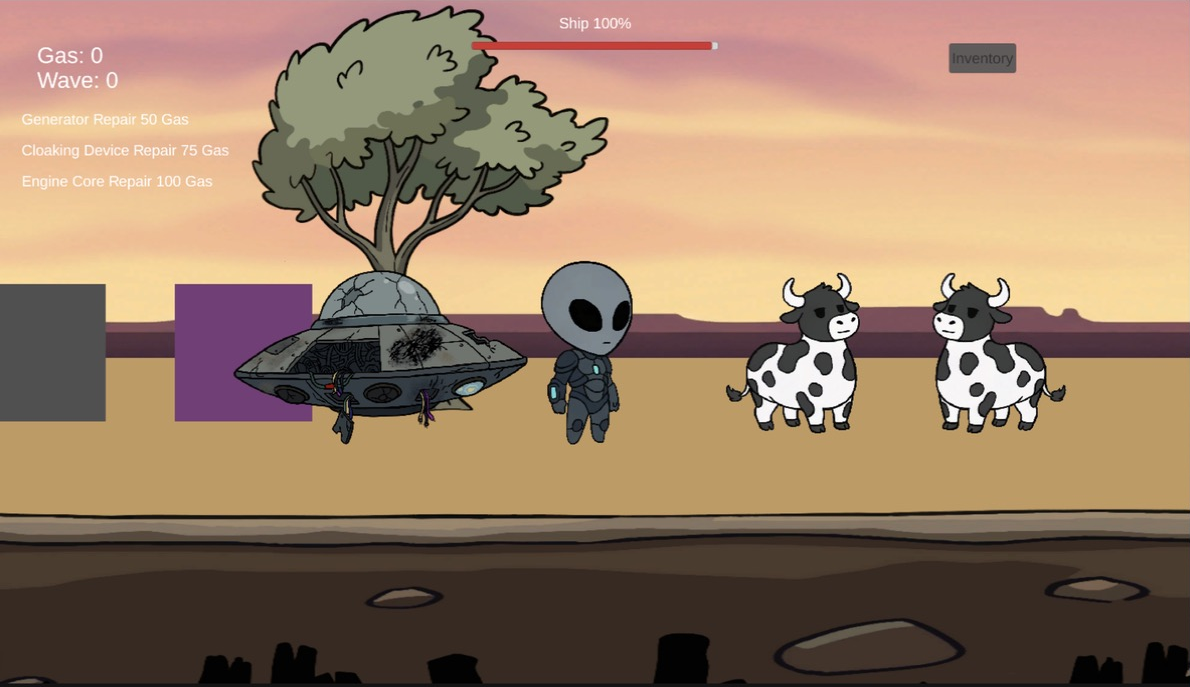
Came back to Flatulence after a three-month gap tonight. First thing I noticed: walk far enough left or right and the sunset behind the ship just stops. Sky, mountains, fence — all of it cuts to a flat wall of blue, like the world runs out.
The investigation
My first move was the obvious one: the background art wasn't wide enough for how far the camera can pan, so I stitched wider versions of the sky and fence art to cover the full range. Reasonable theory. Didn't fix it. The new, much wider images still cut off at almost the exact same spot.
Turned out Unity was quietly deciding, on its own, that these images should be “Sprite Mode: Multiple” — the setting used for sprite sheets with several images packed into one file. My stitched backgrounds have transparent gaps in them (space between fence posts, mostly), and Unity's auto-slicer read those gaps as boundaries between separate sprites. So instead of using my whole wide image, the game was only ever rendering the first narrow slice of it. All that extra width I'd painted was sitting there unused.
Switched both to “Sprite Mode: Single,” which promptly broke the sprite references I'd already placed in the scene, because switching modes deletes the old slice IDs. Reassigned them. Sky and fence both hold now, all the way out to the edges of the level.
The one after that
Fixed the background, took the alien for a test walk, and watched him fall straight through the ground near the edge of the map.
There are two separate “Ground” objects in this scene — one just holds the collision box, one just holds the visible sprite — and neither one had bothered to be as wide as the camera can actually see. The alien was walking clean off the end of an invisible platform. Widened both to match, problem solved, no more falling into the void.
Also tonight
New ambient music track is in and wired up to the gameplay scene. Small thing, makes a difference — the farm actually has an atmosphere now instead of dead silence.
Two bugs, same shape: the fix I reached for first wasn't the actual fix. The real problem was one Unity setting doing something unhelpful by default, quietly, in the background. Worth remembering next time something “should just work” and doesn't.
Next up: the background art itself needs a proper repaint — what's there now is a stitched placeholder and it shows if you look closely. After that, tutorial prompts and the intro comic panels.